Snowflake — things you will never use — (TABLE)SAMPLE
With some functions or keywords in Snowflake I can imagine what it is, but I have never used them and probably never will. But still, I…
With some functions or keywords in Snowflake I can imagine what it is, but I have never used them and probably never will. But still, I thought it would be fun to write some stories about them, starting with: (TABLE)SAMPLE.
TL;DR link
Let’s query the catalog_sales table, it holds 144.006.767.158 records:
select * from snowflake_sample_data.tpcds_sf100tcl.catalog_salesIf we run above query, this happens:
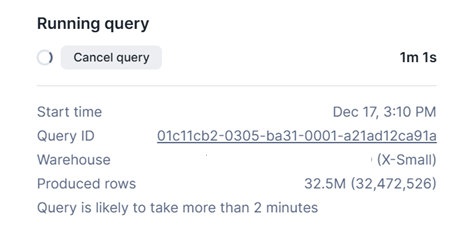
So we have a good reason to limit the number of rows. Let’s try 2 strategies: LIMIT & SAMPLE (TABLESAMPLE can also be used, they are exactly the same):
select * from snowflake_sample_data.tpcds_sf100tcl.catalog_sales
limit 1000;
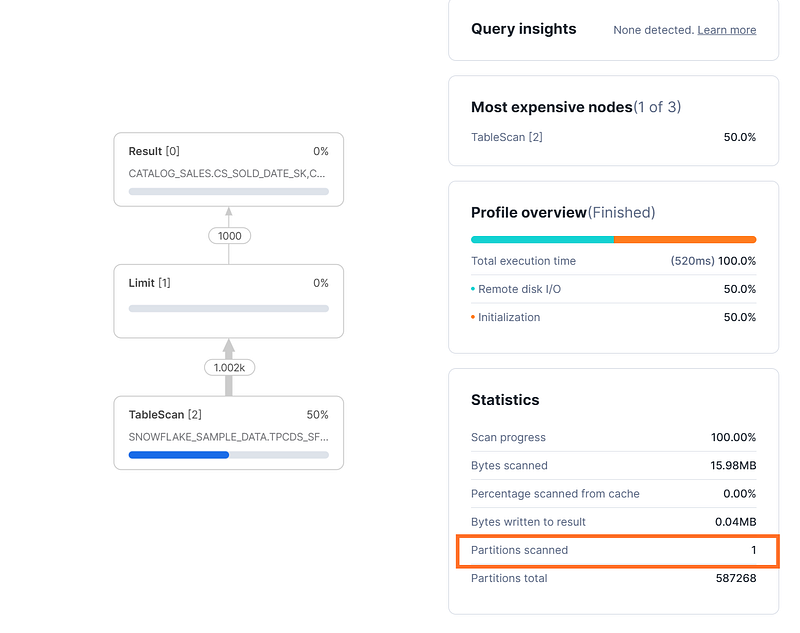
Limit performs quite good, as the 1000 records only need to come from 1 partition as no order by or where clause is used. When running the query for the 2nd time, the result cache will be used, resulting in an even faster query.
select * from snowflake_sample_data.tpcds_sf100tcl.catalog_sales
tablesample(1000 rows);
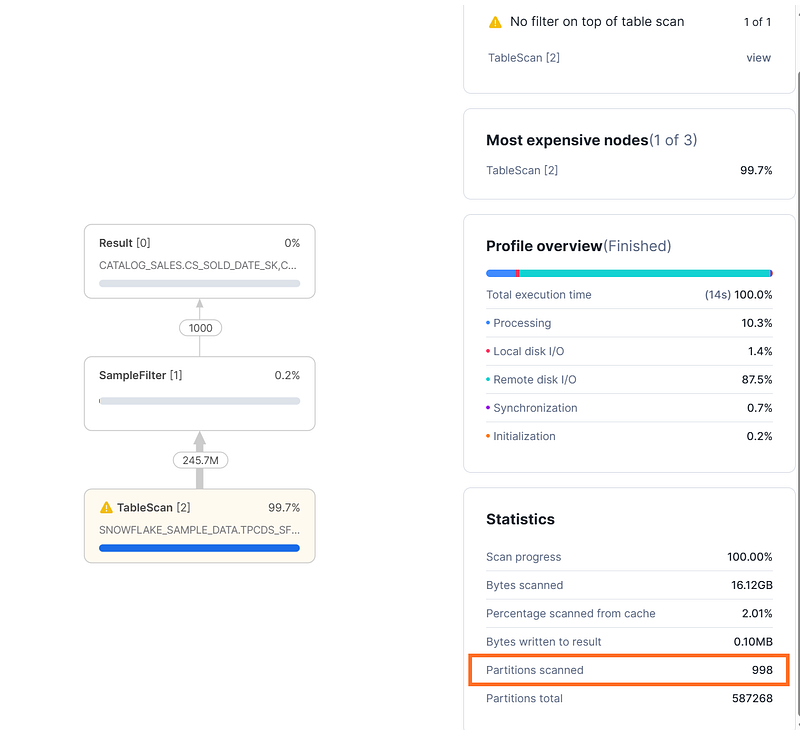
Tablesample for 1000 rows takes more time, since 998 partitions need to be scanned. When running the query for the 2nd time, it takes the same time, as the result cache cannot be used.
Let’s make the challenge a bit more complicated: You want to join 2 tables and limit or sample the results.
The 2 queries below will both result in an error:
select *
from snowflake_sample_data.tpcds_sf100tcl.catalog_sales s limit 100
join snowflake_sample_data.tpcds_sf100tcl.item i limit 100
on s.cs_item_sk = i.i_item_sk;
select *
from snowflake_sample_data.tpcds_sf100tcl.catalog_sales s
join snowflake_sample_data.tpcds_sf100tcl.item i
on s.cs_item_sk = i.i_item_sk
tablesample(1000 rows);The solution is to use the methods the other way around, the tablesample can be applied to the 2 tables and the limit to the query as a whole.
select *
from snowflake_sample_data.tpcds_sf100tcl.catalog_sales s
tablesample(1000 rows)
join snowflake_sample_data.tpcds_sf100tcl.item i
tablesample(1000 rows)
on s.cs_item_sk = i.i_item_sk;
In the above query, where both tables are sampled individually, we are basically in the dark as far as the result is concerned, meaning we will never know how many records will return, since the join condition might well not or only limited be met due to sampling.
If you want to join 2 tables and the final result should be 1000 rows, these are the options:
select *
from snowflake_sample_data.tpcds_sf100tcl.catalog_sales s
tablesample(1000 rows)
inner join snowflake_sample_data.tpcds_sf100tcl.item i
on s.cs_item_sk = i.i_item_sk;
select *
from snowflake_sample_data.tpcds_sf100tcl.catalog_sales s
inner join snowflake_sample_data.tpcds_sf100tcl.item i
on s.cs_item_sk = i.i_item_sk
limit 1000;The difference:
- when using the SAMPLE, the result will be different each time you run the query, and the result cache will not be used.
- when using LIMIT, the result will always be the same and the result cache will be used
Scenario’s where this can be used:
- if you want to use a limited number of records as input for testing scenario’s and they need to be diffrent each time: use SAMPLE. For advanced scenario’s, but I can’t think of one: use sampling parameters such as Bernoulli
- for a fixed set, just to look at the data: use LIMIT
And, finally, since a lot of content nowadays is written using AI (but not this one, since I wanted to experiment a lot), I am curious what AI (using Mistral) will answer on this prompt: “can you describe, in max 50 words, what the difference is between Snowflake LIMIT and SAMPLE”:
Answer:
Snowflake LIMIT restricts the number of rows returned in the result set, always from the start (e.g., LIMIT 10 returns the first 10 rows).
SAMPLE randomly selects a percentage or fixed number of rows from the entire result set (e.g., SAMPLE(10) returns 10 random rows).
LIMIT is ordered; SAMPLE is random.